Built for 2026 REBUILT

Know every robot before alliance selection.

Recon is match and pit scouting for FRC teams. Your scouts use their own phones, your strategy table gets a live dashboard and a picklist, and every team on Recon can pool its scouting — for one event or the whole season.

No app to installKeeps working offlineOpen source
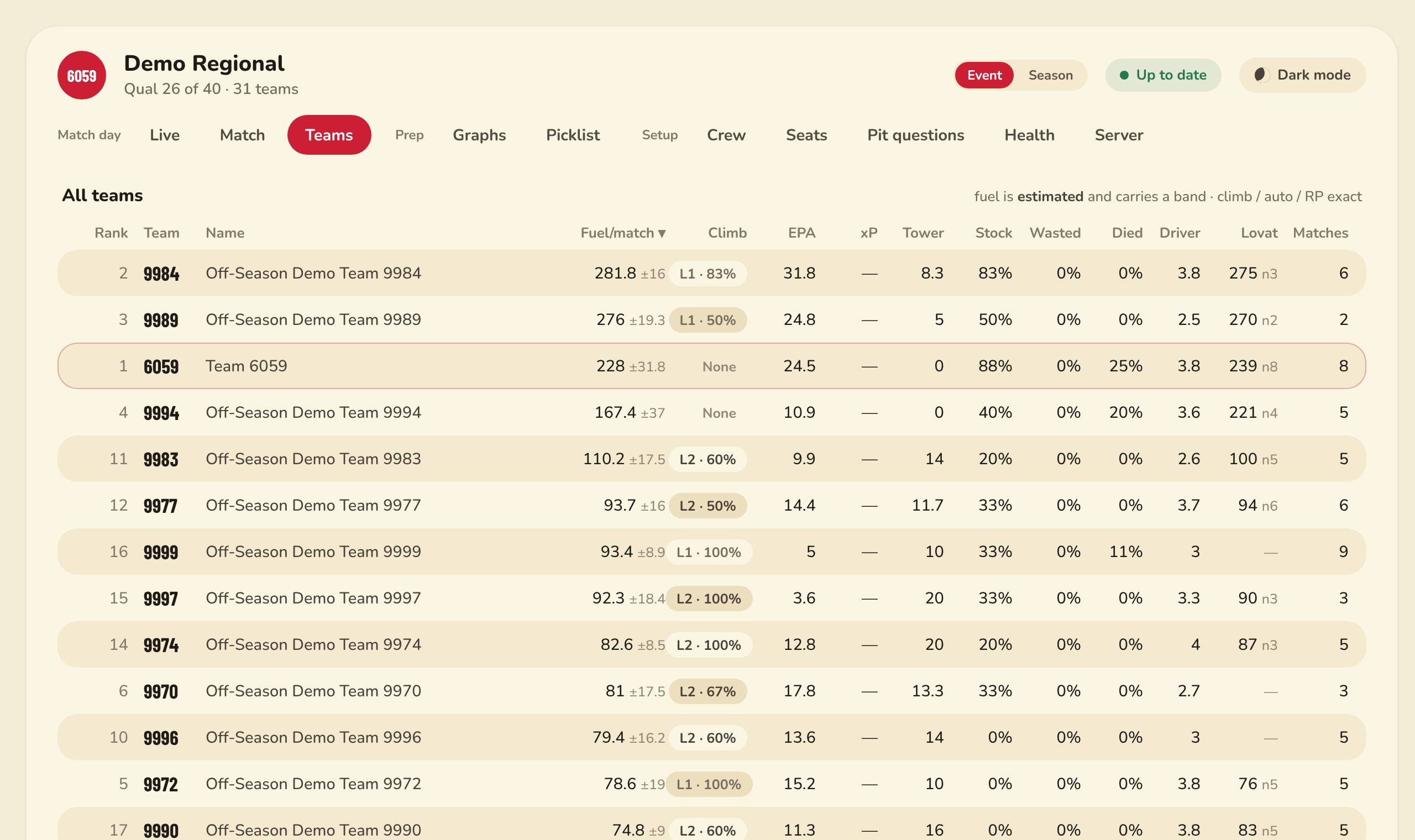
The Recon strategy dashboard: every team at an event, ranked by fuel per match, with climb, EPA and reliability columns.
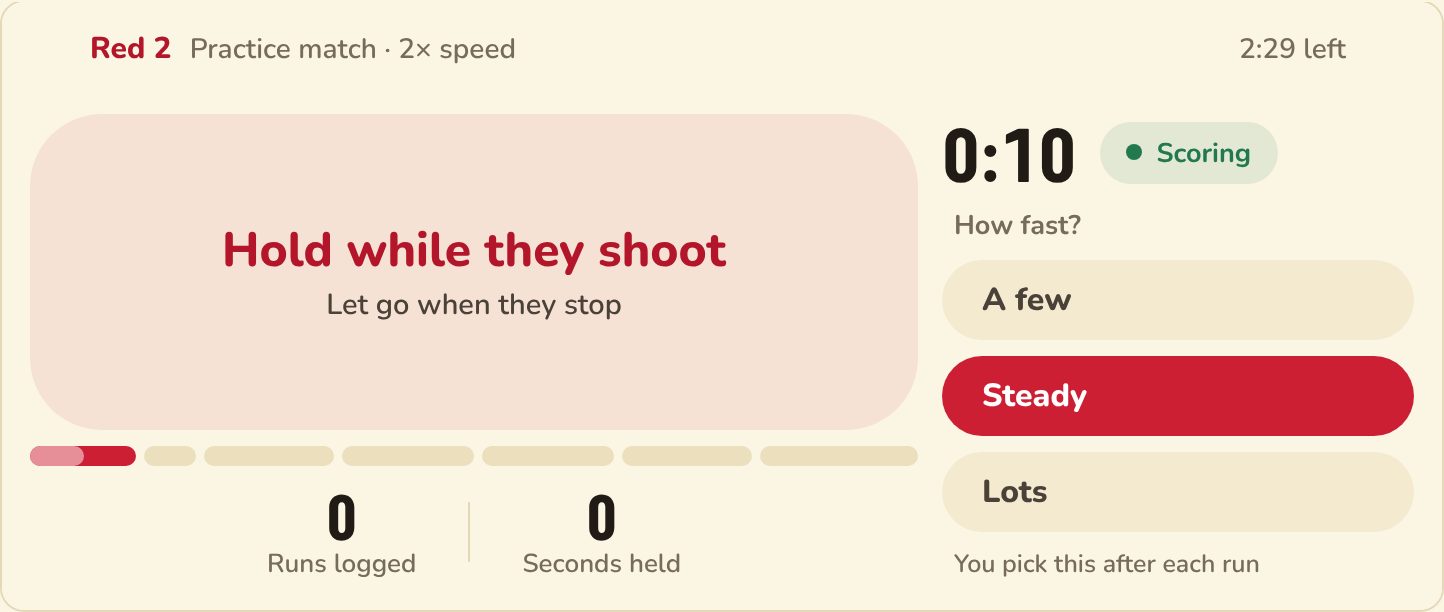
The scouting screen on a phone in landscape: one big button to hold while the robot shoots, and how fast.
1 robotper scout. Nobody counts balls — they hold a button while their robot shoots.
0 installsScouts scan a QR code and they're in, on whatever phone they brought.
Every matchchecked against the official score, so the numbers add up.
All teamscan pool their scouting, so more of the field is watched than six scouts can.
Match scouting

One robot. One thumb. That's the whole job.

Counting balls at match speed is impossible, so Recon doesn't ask. A scout holds the button while their robot shoots and says roughly how fast. After the match, Recon splits the official alliance total between the three robots using what the scouts held.

  • Simple one-button mode, or a two-thumb layout for confident scouts
  • Auto start, climb, defence and notes in a few taps after the buzzer
  • Saves on the phone first — a dead venue network loses nothing
  • A four-minute practice mode that teaches the whole job
The scouting screen during a practice match: a large 'Hold while they shoot' button, the match clock, and A few / Steady / Lots speed choices.
Strategy dashboard

Fuel per robot, not per alliance.

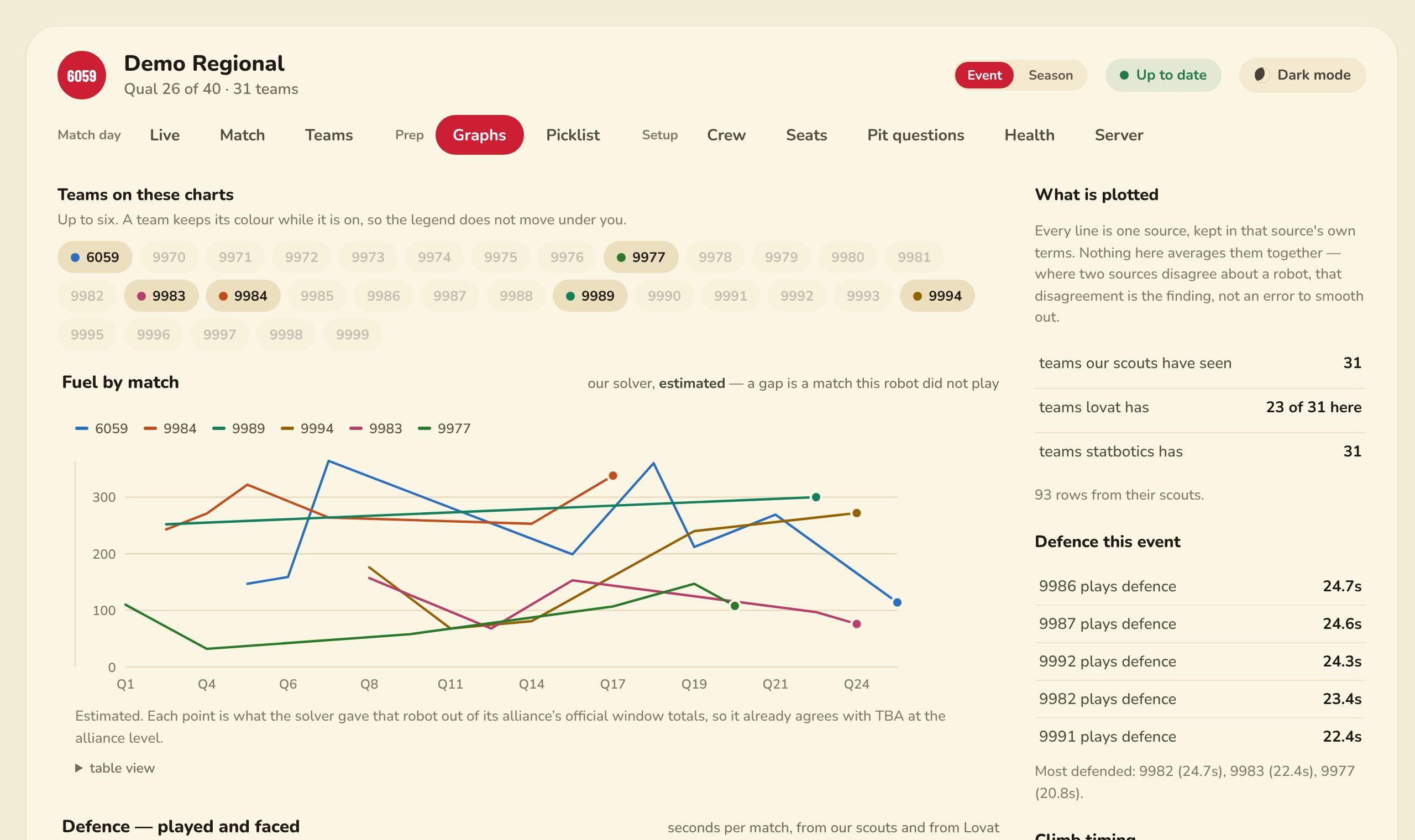
Every number on the dashboard is either exact, straight from the official results, or estimated and shown with its margin of error. Charts show who is getting better, who plays defence, and who gets defended.

  • Teams table with fuel per match, climb, EPA, driver rating and more
  • Graphs per match for up to six robots at once
  • Pulls in The Blue Alliance, Nexus, Statbotics, FRC Events and Match 13
  • Optional AI summaries of scout notes, matches and your picklist
The Graphs tab: fuel by match for six teams as coloured lines, with defence and climb timing panels.
Match preview & picklist

Walk into the queue with a plan.

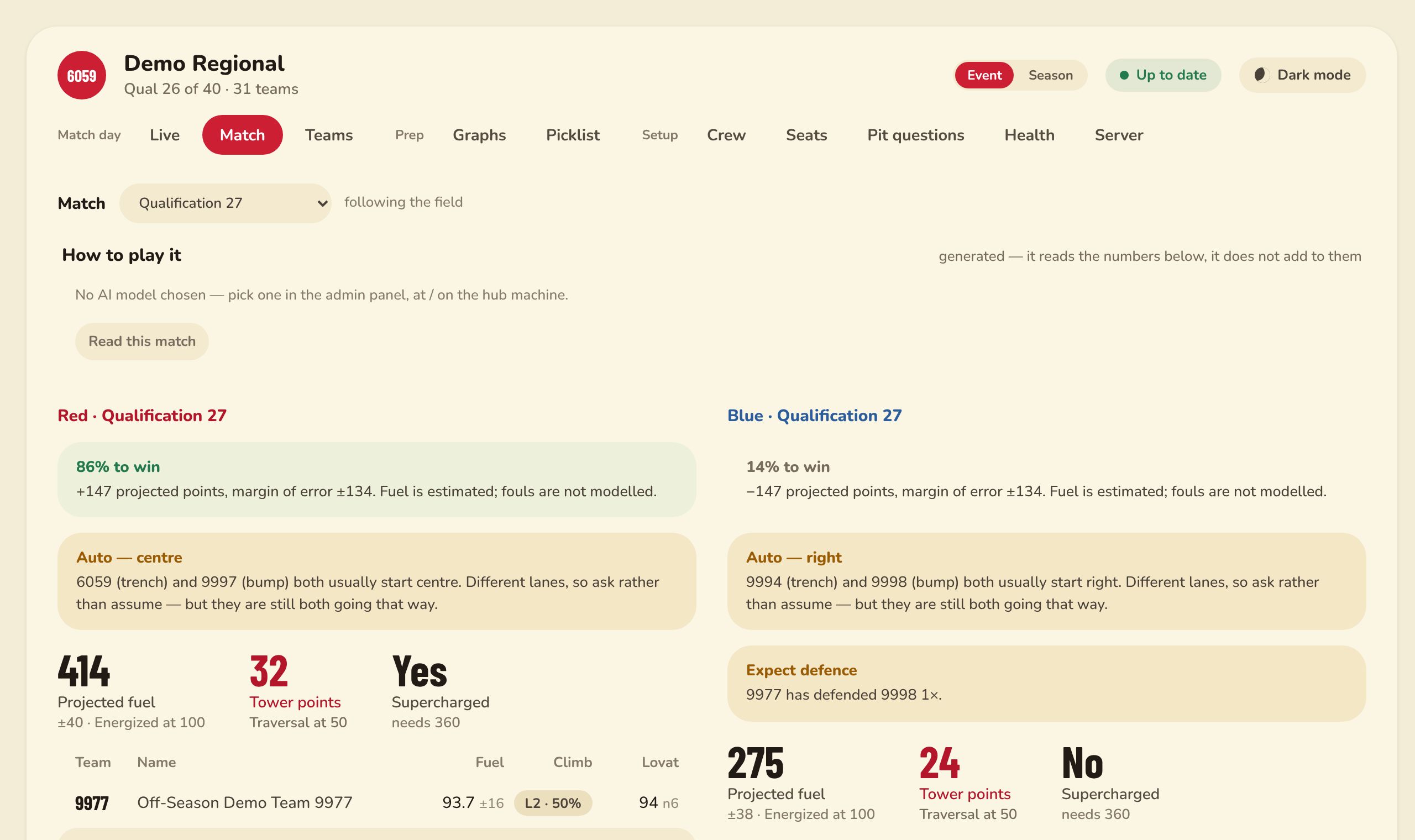
Pick any upcoming match and Recon projects both alliances: fuel, tower points, win chance, where each robot likes to start, and who is likely to play defence on whom.

  • Projected points with an honest margin of error
  • Auto start conflicts flagged before they happen
  • A drag-to-reorder picklist with first and second pick weights
  • A printable picklist for when the laptop isn't welcome at the table
The Match tab: red and blue alliances side by side with win chance, projected fuel, tower points and auto start notes.
Pit scouting

Pits, by the map.

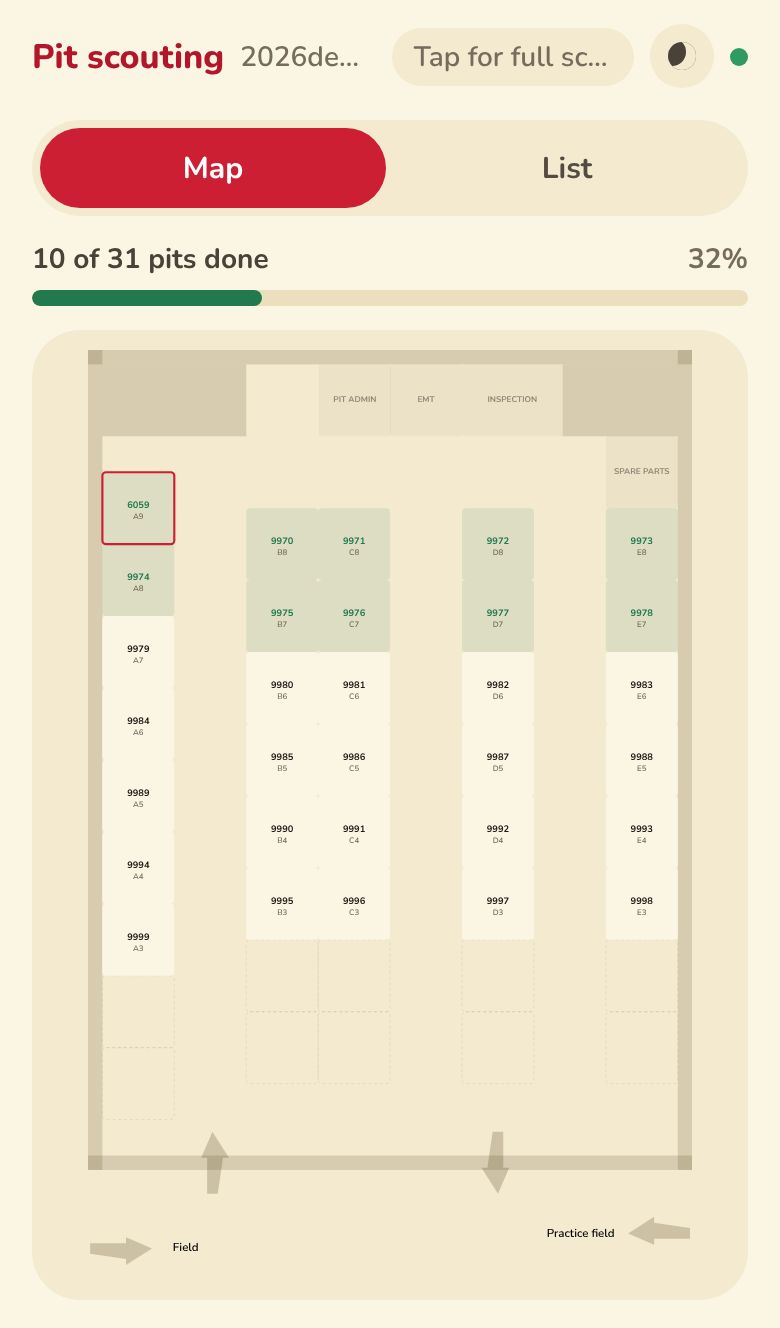
Pit scouts see the venue's own floor plan, coloured by what has already been scouted, so they know where to walk next. Two scouts never end up at the same pit: opening a robot's form tells every other phone who has it.

  • Drivetrain, shooter, climb, autos, weight, notes and photos
  • Your team's own questions — choices, yes/no, numbers or text
  • Every answer lands in the dashboard and the pit spreadsheet
The pit scouting map on a phone: the venue floor plan with scouted pits in green and the team's own pit outlined in red.
Ours, or everyone's

Six scouts can't watch a whole regional. Every team together can.

All scouting on Recon is shared between teams. Look at just your own team's numbers, or add every other team's scouting on top. Then choose this event, or each robot's whole season so far.

  • Two switches at the top of the dashboard — flip them any time
  • Your admin picks the view your team opens on
  • Your picklist, your scouts' grades and your API keys stay yours
Whose data
How much
8
matches of one robot seen by your scouts, at this event
your scouts other teams' scouts
An illustration with made-up numbers — try the switches.
How it works

Ready before your first practice match.

There is nothing to install on anybody's phone or laptop. Everything runs here.

1

Set up your team

Make an account, pick your event, and paste in a Nexus or Blue Alliance key so the schedule arrives on its own.

2

Hand out the join code

Show scouts a QR code or an 8-letter code. They're scouting for your team in seconds — no accounts, no app store.

3

Watch the numbers fill in

The dashboard updates as each match ends. Add your strategy people with their own sign-ins, and build the picklist together.

Questions

Good to know

Do scouts need an account or an app?

No. A scout types their team's join code or scans its QR code, in the phone's normal browser. Only leads and strategy people sign in.

What happens when the venue wifi dies?

Scouting carries on. Every phone saves what it records straight away and sends it when it can reach Recon again, over wifi or mobile data.

Who can see our data?

Match and pit scouting is shared with the other teams on Recon — that's what makes the "ours + everyone" view work. Your picklist, your scouts' individual grades, your API keys and your team's accounts are never shared.

How do scouts make sure they're scouting for the right team?

The join code is the team. A phone that uses your code scouts only for you, and remembers it for the season. If a code gets out, your admin makes a new one and every phone has to rejoin.

Can we run it on our own laptop instead?

Yes. Recon is open source and also runs as a single team's hub on one laptop at the venue, with nothing hosted at all.

Which game does it support?

The 2026 FRC game, REBUILT presented by Haas: fuel, the hub, the tower and its three climb levels.
Bring Recon to your next event.

Set your team up in a minute. Your scouts only need the join code.